Your cloud bill is predictable in one direction only: up. And somewhere in the last renewal cycle, your compliance team handed you a document residency requirement that your hyperscaler's region list cannot satisfy, or your trading desk told you that 40 milliseconds of round-trip latency is costing real money. So now you are doing the math that nobody wanted to do in 2021: what would it actually cost to run this workload on an on-premises server you own, in a building you control?
This guide gives you that math and the decision framework behind it. We will walk through what Dell certification means for a production server, the five signals that tell you a workload belongs on-premises, a 36-month total cost of ownership (TCO) model you can copy, and a migration checklist for your on-prem deployment that does not involve a maintenance window at 3 AM and a prayer. By the end, you will be able to answer the question workload by workload instead of ideology by ideology.
Key takeaways:
- On-premises servers win for latency-bound, data-residency-bound, and steady-state high-utilization workloads; cloud VMs win for spiky, stateless, and dev/test workloads.
- Dell-certified hardware such as the Leo CN line means validated firmware stacks, predictable spare-parts availability, and a single accountable vendor for the whole stack.
- At 24/7 high utilization, a 64-core / 512 GB RAM / 20 TB NVMe workload costs roughly $220,000 to $250,000 over 36 months in the cloud versus roughly $83,000 on-premises.
- The break-even utilization point is decisive: below 30 to 40% cloud wins, above 60% dedicated bare metal wins.
- The strongest 2026 architecture is hybrid: Leo CN on-premises for the baseline, cloud VMs for the peaks, managed from one identity, network, and observability plane.
Table of Contents
- Why 'On-Premises Is Dead' Was Always Wrong: The Workloads That Never Should Have Left
- What Dell Certification Actually Means, and Why It Matters for Production Reliability
- The Five Workload Signals That Tell You On-Premises Is the Right Call
- Total Cost of Ownership Modelling: Cloud VM Opex vs. On-Premises Capex Over 36 Months
- Latency, Compliance, and Data Residency: The Three Forces That Override Cost Arguments
- How to Design the On-Prem Deployment: Network Topology, Remote Management, and Failover for Leo CN
- Hybrid Posture: Running Leo CN On-Premises While Bursting to Cloud VMs From One Control Plane
- The Migration Checklist: How to Move a Workload from Cloud to On-Premises Without Downtime
- Decision Matrix: Leo CN vs. Cloud VMs vs. X7000 Bare Metal, Which Wins for Your Workload?
Why 'On-Premises Is Dead' Was Always Wrong: The Workloads That Never Should Have Left
The "cloud-first, cloud-only" doctrine of the late 2010s treated infrastructure as a binary choice. That was always a category error. Cloud is an operating model, not a destination, and certain workloads were never good candidates for it in the first place.
Three categories resisted the migration wave and still do:
- Latency-bound workloads. Manufacturing line control, high-frequency data ingestion, real-time pricing engines, and anything talking to physical equipment on a LAN. Physics does not care about your cloud roadmap; a packet crossing a metro fiber link takes longer than one crossing a switch in your own rack.
- Data-residency-bound workloads. Health records, payment card data, defense-adjacent engineering files, and anything a regulator expects to find inside a specific jurisdiction, sometimes inside a specific building. If you need to answer "where physically is this byte?" with a room number, a public cloud region is a compromise, not an answer.
- Steady-state, high-utilization workloads. A database running at 70% average utilization for three years is the worst possible cloud customer. You are paying the rental premium on capacity you never flex.
The industry has caught up. Analysts and practitioners now describe 2026 as the year of workload-by-workload repatriation rather than wholesale migration in either direction, and the bestarhost analysis of why 2026 is the year of cloud repatriation makes the same case: cost predictability and sovereignty, not nostalgia, are driving the return. We covered the migration mechanics in detail in our hyperscaler-to-bare-metal repatriation playbook, so this article focuses on the decision framework that should come before any migration.
What Dell Certification Actually Means, and Why It Matters for Production Reliability
Anyone can put a motherboard in a chassis and call it a server. Dell certification means the specific hardware configuration (CPU steppings, memory qualification, firmware stack, thermal profile, power supply behavior) has been validated against Dell's reference designs and is covered by Dell's support and spare-parts pipeline.
For an IT director, that translates into four concrete things:
- Firmware coherence. BIOS, iDRAC, NIC, and drive firmware versions are tested as a set, not discovered to be incompatible during a Tuesday-night patch window.
- Predictable spare availability. A failed PSU or DIMM is a same-day or next-business-day part from a global supply chain, not a 6-week wait for a whitebox component from a distributor that may or may not stock it.
- Validated thermal and power envelopes. The chassis will actually sustain full CPU load in your server room's ambient temperature, which matters more than any spec sheet number.
- Support escalation that goes somewhere. When you open a ticket, the vendor recognizes the hardware configuration and has documented failure modes for it.
The Leo CN line takes that certification and packages it for on-premises deployment: Dell-certified hardware, delivered as a PlusClouds bare-metal system, so you get enterprise vendor support on the silicon and a single vendor accountable for the whole stack. That second part matters more than most procurement teams realize. A whitebox server gives you a hardware warranty; a certified platform gives you someone to call when the problem turns out to be firmware, not hardware.
The Five Workload Signals That Tell You On-Premises Is the Right Call
Run each candidate workload through these five questions. Three or more "yes" answers and the conversation is effectively over.
- Does the data have a legal or contractual residency requirement? GDPR processing agreements, HIPAA business associate terms, PCI DSS scope, or a customer contract that names a physical location. If yes, the cloud conversation shifts to "which provider can prove this," and often the honest answer is nobody, at the price point you want.
- Is the workload latency-sensitive below about 5 milliseconds? Anything talking to factory equipment, local storage clusters, or real-time user populations concentrated in one building or campus.
- Is utilization steady and predictable? If your 36-month utilization forecast sits above roughly 50% with low variance, the cloud's elasticity premium buys you nothing.
- Does the workload need non-standard hardware? Specific NICs, HBA cards, TPM configurations, or security modules that hyperscalers do not offer as VM shapes.
- Is there a hard cost ceiling or budget-predictability mandate? Finance wants a number it can put in a spreadsheet for three years. Cloud opex resists that; a financed server does not.
If you answered "yes" mostly to questions 1 and 2 and "no" to the rest, look hard at whether a single-tenant hosted bare metal option (rather than on-premises ownership) solves the residency problem without the facilities burden. We compared the isolation models in Multi-Tenant Cloud vs. Single-Tenant Bare Metal.
Total Cost of Ownership Modelling: Cloud VM Opex vs. On-Premises Capex Over 36 Months
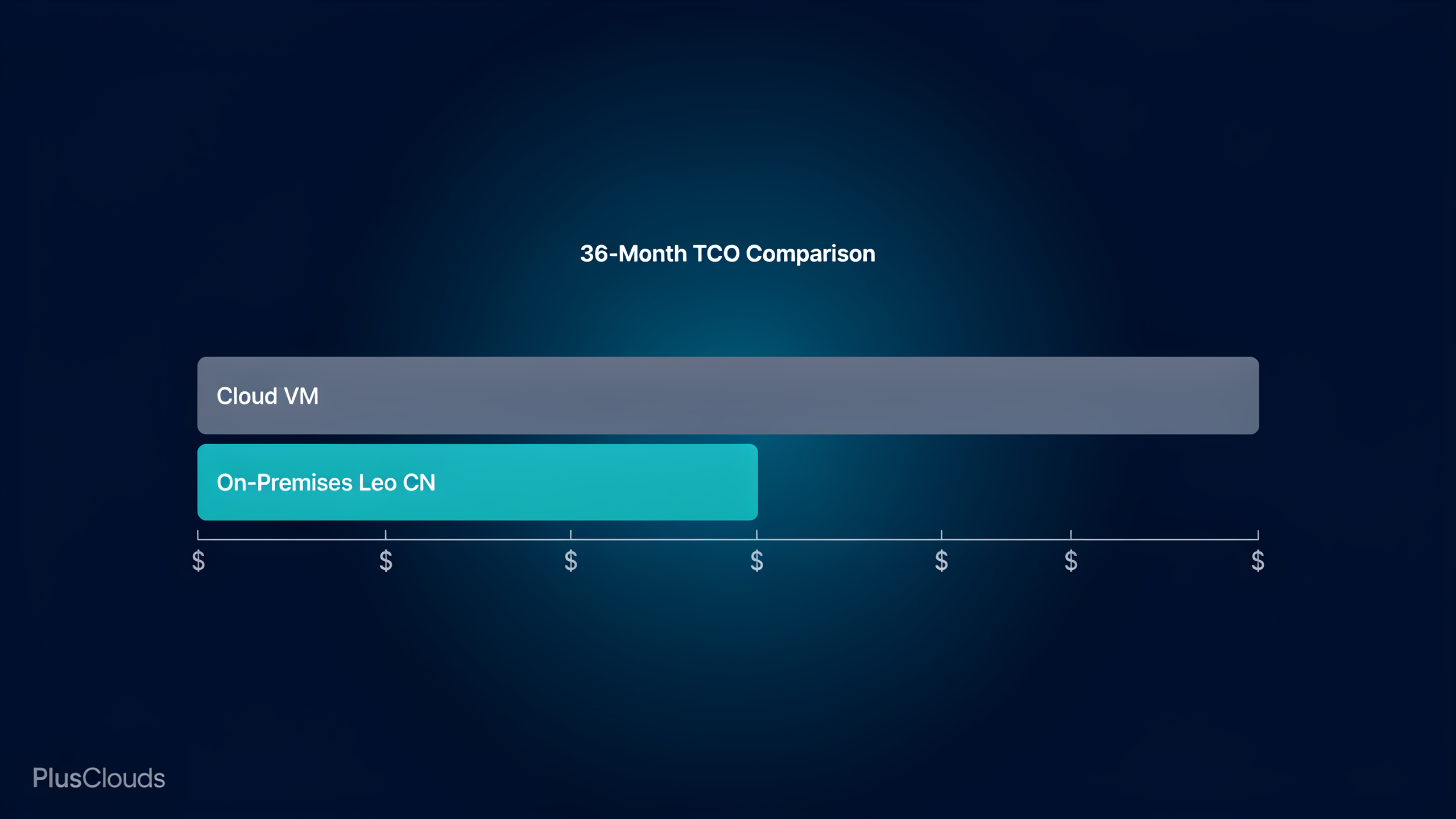
Here is the model, with realistic placeholder numbers you should replace with your own quotes. Assume a workload needing 64 cores, 512 GB RAM, and 20 TB of fast storage, running 24/7 at high utilization.
| Cost line | Cloud VM (36 months) | On-premises Leo CN (36 months) |
|---|---|---|
| Compute + RAM | ~$180,000 (list, on-demand) | Included in server capex (~$45,000) |
| Storage (NVMe/SSD class) | ~$40,000 | Included (~$8,000 in drives) |
| Egress / transfer | $0 to $30,000+ (provider-dependent) | $0 |
| Power + cooling | Included | ~$6,000 (2 kW average draw) |
| Rack space, spares, maintenance | Included | ~$9,000 over 3 years |
| Staff time (patching, capacity, break-fix) | Lower | Higher; budget ~$15,000 of engineer time |
| Rough total | ~$220,000 to $250,000 | ~$83,000 |
Three honesty requirements before you take that table to your CFO:
- Cloud list pricing is negotiable. A committed-use discount can cut the cloud column by 30 to 40%. Run the model with your actual negotiated rates.
- On-premises is not free of opex. The staff-time line is real, and understaffed teams are the ones who get surprised by it.
- The break-even utilization point is the whole game. Below roughly 30 to 40% steady utilization, cloud wins. Above roughly 60%, dedicated hardware wins decisively. The comparisons of bare metal versus cloud economics at americancloud.com, unihost.com, and hostdime.com all converge on the same conclusion: the answer depends almost entirely on utilization and commitment length, not on which technology is "better."
One more line item people forget: egress. If your workload moves large datasets to users or between environments, zero-egress-fee platforms like PlusClouds Cloud Servers change the cloud column materially, because hyperscaler egress pricing is the single most common line-item surprise in enterprise cloud bills.
Latency, Compliance, and Data Residency: The Three Forces That Override Cost Arguments
Cost is the tiebreaker, not the driver. Three forces will make this decision for you before the spreadsheet does.
Latency. Measure it, do not estimate it. A ping from your workload's client population to the cloud region versus to an on-premises server tells you everything. For workloads inside a single facility, on-premises round trips are typically under 1 millisecond; any cloud path starts at the metro fiber and goes up from there. If your workload does thousands of sequential round trips per transaction, that difference compounds brutally.
Compliance. Frameworks increasingly care about physical control. If you operate in financial services, the DORA Article 11 & 12 backup and recovery requirements expect you to demonstrate recovery capability with documented RPO and RTO targets, and an on-premises primary with a contracted remote recovery site is often the cleanest way to evidence that. PCI DSS scope, meanwhile, shrinks dramatically when cardholder data never touches shared infrastructure; we mapped the segmentation and backup controls in our PCI DSS 4.0.1 cloud compliance guide.
Data residency. Sovereignty requirements are tightening across jurisdictions, and the practical question for sovereign workloads is no longer "which country" but "which building." Our data sovereignty guide for 2026 covers the jurisdictional mechanics; the infrastructure answer is either an on-premises deployment or a national in-country provider whose datacenter you can audit.
If any of these three forces applies with real weight, run the TCO model anyway, but understand that you are now negotiating the price of a decision that has already been made.
How to Design the On-Prem Deployment: Network Topology, Remote Management, and Failover for Leo CN
A production on-premises deployment lives or dies on three design decisions made before the hardware ships.
Network topology. Separate your traffic classes from day one: a public-facing segment, a private workload segment, a management segment, and a DMZ for anything internet-facing. This is the same discipline we apply in hosted environments; PlusClouds Networking & Load Balancers exposes exactly this five-network model (public, private, VPN, management, DMZ) from one control plane, and mirroring that structure on-premises keeps your hybrid story simple later. A minimal VLAN plan:
VLAN 10  workload     10.10.10.0/24   (application servers, east-west)
VLAN 20  storage      10.10.20.0/24   (dedicated, jumbo frames enabled)
VLAN 30  management   10.10.30.0/24   (iDRAC/BMC, no internet route)
VLAN 40  dmz          10.10.40.0/24   (reverse proxies, edge services)
Remote management. The Dell iDRAC interface on a Leo CN is your out-of-band lifeline. Put it on the management VLAN, give it its own credentials and MFA, and test remote console access before you need it at 2 AM. An out-of-band management path you have never tested is a decoration, not a capability.
Failover. Decide your availability target and buy to it. Two Leo CN nodes with shared storage and a virtualization or clustering layer gets you node-level failover. For the recovery side, an on-premises primary with automated replication to a remote site is the pattern regulators actually want to see documented; PlusClouds' Automated Backup handles the explicit RPO/RTO targets and remote restore, whether the primary is in your building or in our Tier 3 datacenter with N+1 redundancy on a 40 Gbps backbone.
Hybrid Posture: Running Leo CN On-Premises While Bursting to Cloud VMs From One Control Plane
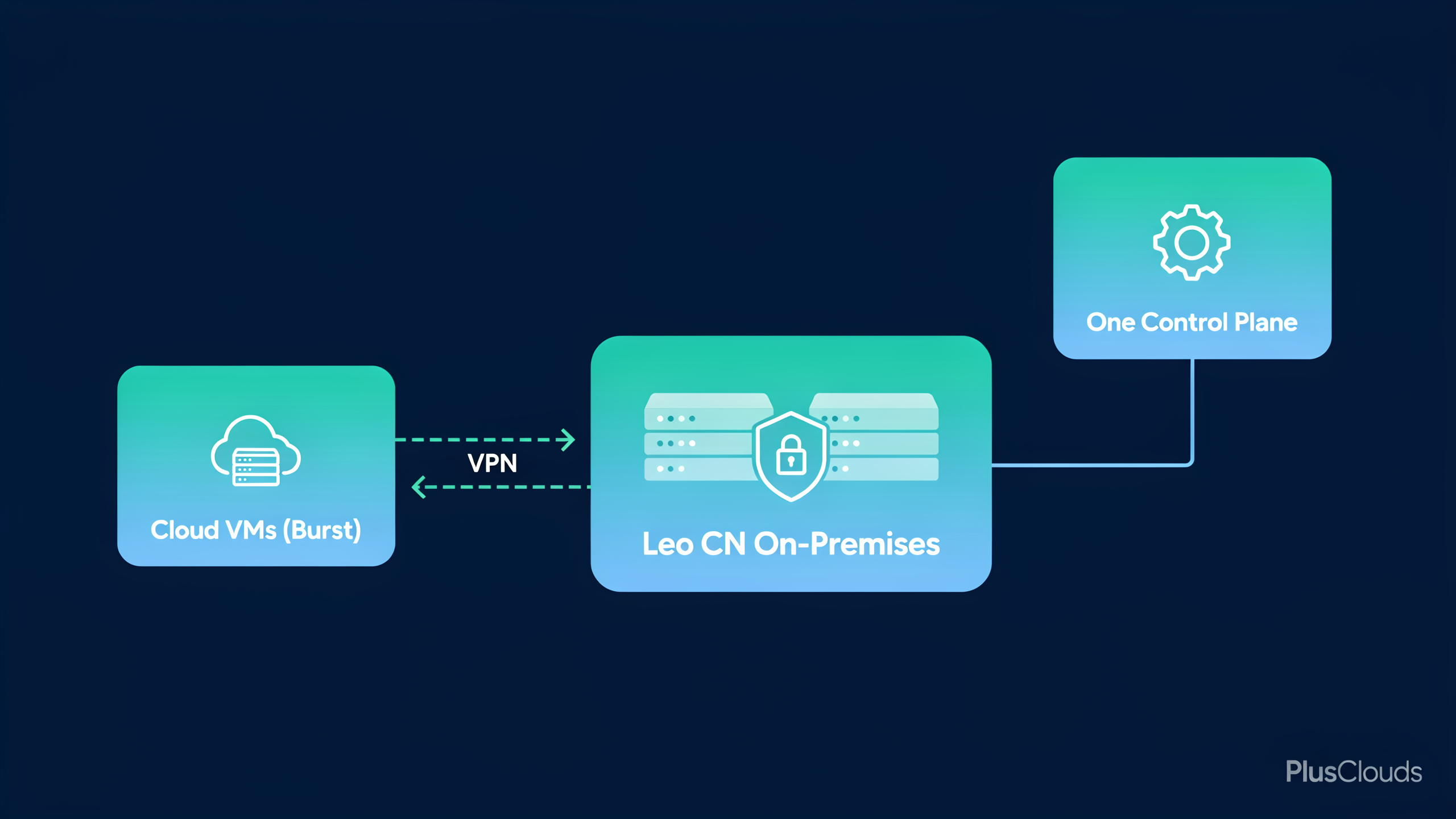
The strongest 2026 architecture is not "on-premises instead of cloud." It is "on-premises for the baseline, cloud for the peaks and the exceptions."
The pattern works like this: your steady-state, residency-bound, latency-sensitive workload runs on Leo CN hardware in your building. Spiky components (batch analytics, seasonal traffic, dev/test environments) run on cloud VMs. The design rules that make it work:
- One identity plane. Same SSO, same secrets management, same configuration management across both environments. Divergent identity is the number-one killer of hybrid sanity.
- One network plane. A site-to-site VPN or dedicated link between your building and the cloud environment, with the same segmentation model on both sides.
- One observability plane. Metrics, logs, and alerts from both environments land in the same place, or your on-call rotation will learn about failures from users.
- Explicit burst policy. Define what triggers a burst (CPU threshold, queue depth), what can burst (stateless tiers only), and what never leaves the building (the data your regulator cares about).
This is also where the economics get elegant: you size the Leo CN deployment for your 90th-percentile baseline, not your peak, and let elastic cloud VMs absorb the tail. You pay the rental premium only on the capacity that actually varies.
The Migration Checklist: How to Move a Workload from Cloud to On-Premises Without Downtime
Repatriation fails when teams treat it like a big-bang cutover. It succeeds when treated as a replication-then-shift project. The sequence:
- Inventory dependencies. Map every DNS name, secret, API endpoint, and third-party integration the workload touches. Miss one and your cutover night becomes memorable.
- Provision and validate the target. Stand up the Leo CN nodes, apply the firmware stack as a validated set, and burn in for at least a week under synthetic load before anything production-shaped touches them.
- Establish continuous replication. Use database-native replication (streaming replication, log shipping) or storage-level sync from the cloud source to the on-premises target. Keep it running until lag is consistently near zero.
- Run the shadow workload. Point a test consumer at the on-premises copy and validate functional parity, performance, and monitoring coverage.
- Cut over with a rollback path. Lower DNS TTLs to 60 seconds a day in advance, schedule the switch, reverse the replication direction immediately so the cloud environment becomes the standby. If anything breaks, you fail back in minutes, not hours.
- Decommission on a delay. Keep the cloud environment running (and paying) for 30 days. It is cheap insurance and it is your rollback target.
Budget two to four weeks for a typical stateful workload, most of it in validation rather than transfer.
Decision Matrix: Leo CN vs. Cloud VMs vs. X7000 Bare Metal, Which Wins for Your Workload?
Bring the three options side by side, because they are not interchangeable and the right answer depends on where the workload sits.
| Decision factor | On-premises Leo CN | Cloud VMs | X7000 hosted bare metal |
|---|---|---|---|
| Physical control / residency | Full (your building) | Provider region | Provider datacenter, auditable |
| Latency | Sub-millisecond on LAN | Metro + internet path | Low, but network-dependent |
| Cost profile at high utilization | Best over 36 months | Worst | Best in class for hosted |
| Elasticity | None; buy for peak | Unlimited | None |
| Hardware customization | Full (NICs, TPM, HBAs) | Limited to VM shapes | High |
| Ops burden on your team | Highest | Lowest | Low to moderate |
| Best fit | Regulated, latency-bound, steady-state | Spiky, stateless, dev/test | High-performance dedicated workloads without the facilities |
Read it this way: if the workload must live in your building, the question is not Leo CN versus cloud, it is Leo CN versus a lesser on-premises option, and Dell certification plus a single accountable vendor settles that. If the workload is spiky and stateless, stop reading, deploy a Cloud Server in 60 seconds and move on. If it needs raw dedicated performance but not your building, the X7000 hosted bare metal line gives you single-tenant hardware without the server room.
You now have the framework: five workload signals, a 36-month TCO model with honest caveats, and a migration path that does not require downtime. If you want to price the Leo CN option against your actual cloud spend, talk to the PlusClouds bare-metal team with your utilization numbers in hand; the model above will do the rest.