Your database just started throwing I/O timeouts, someone on the team suggests "moving files to S3," and now you're three Slack threads deep into a debate about whether that would actually fix anything. Sound familiar?
The confusion is understandable. Both object storage and block storage hold your data. Both are "cloud storage." But they solve fundamentally different problems, and picking the wrong one doesn't just cost you money. It can cost you performance, reliability, and weeks of re-architecture work down the line.
The good news is that the decision is simpler than most vendor documentation makes it seem. Once you understand how each storage type actually works under the hood, the right choice for a given workload is usually obvious. This guide walks you through the mechanics, the trade-offs, and a practical decision framework you can apply to your own architecture today.
Table of Contents
- Key Takeaways
- The Core Difference: How Object and Block Storage Actually Work
- Performance: When Sub-Millisecond Latency Matters (and When It Doesn't)
- Scalability and Cost: Object Storage's Killer Advantage at Scale
- Use Case Map: Databases, VMs, Backups, Media, and ML Datasets
- Why Most Production Architectures Use Both Object and Block Storage
- Object Storage for AI/ML: Storing Training Data and Model Checkpoints
- How to Avoid Egress Fee Traps with S3-Compatible Storage
- PlusClouds S3 Object Storage: Architecture and Pricing Explained
- Decision Framework: Choosing the Right Storage Tier for Your Workload
Key Takeaways
- Block storage delivers sub-millisecond, disk-level latency and is required for databases, virtual machine disks, and Kubernetes persistent volumes.
- Object storage (S3-compatible) stores files as objects with metadata in flat buckets, scales without limits, and costs a fraction of block storage per GB.
- Backups, media, logs, container images, and AI/ML training datasets belong on object storage; anything needing a mounted filesystem belongs on block storage.
- Egress fees are the biggest hidden cost in cloud storage. Co-locating compute and storage with a zero-egress provider changes the economics of data-heavy pipelines.
- Most production architectures use both storage types, each for what it does best.
The Core Difference: How Object and Block Storage Actually Work
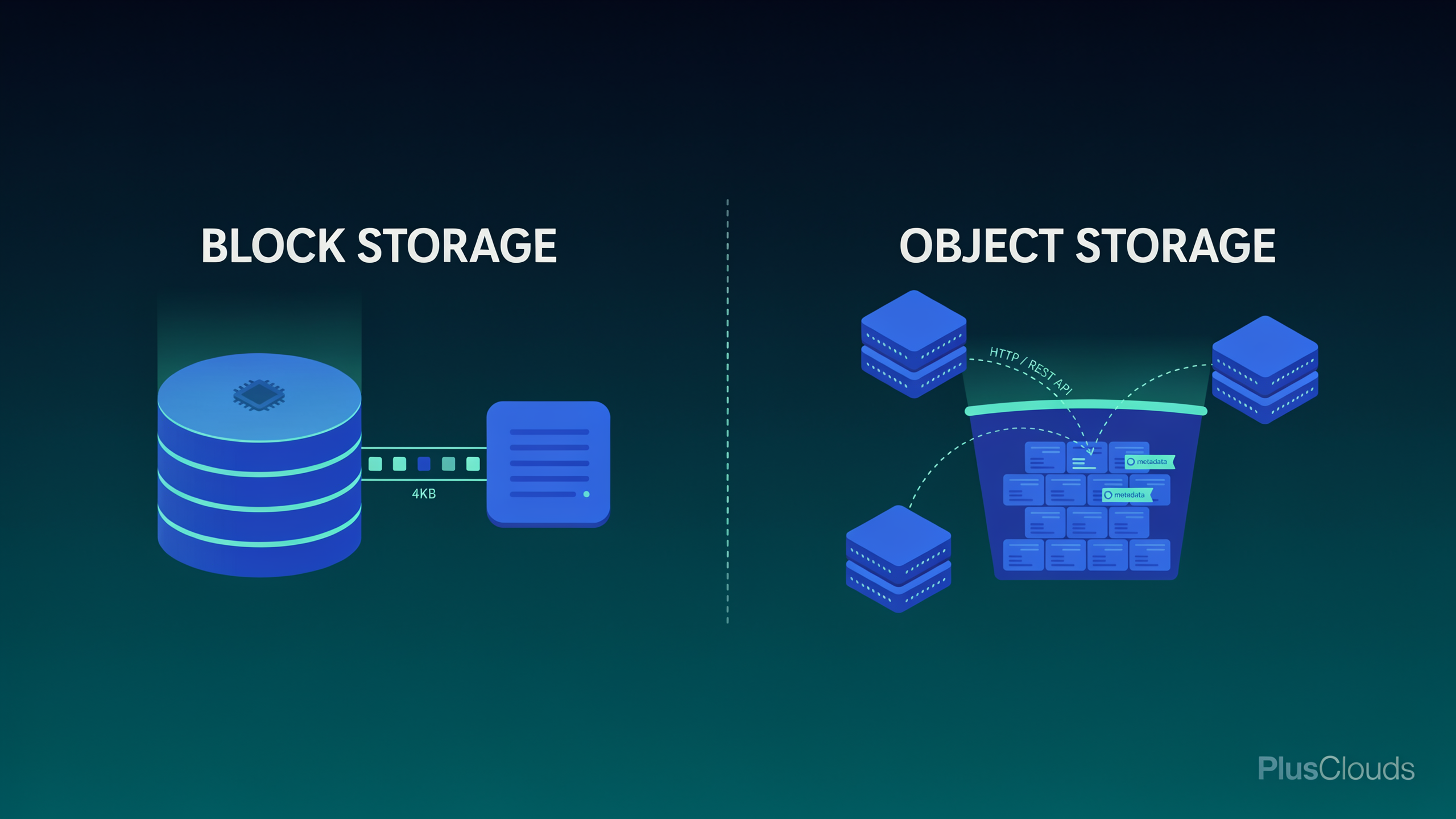
Block storage chops data into fixed-size blocks (typically 4KB to 64KB) and stores them on a physical or virtual disk. Your operating system sees this storage as a raw volume, formats it with a filesystem like ext4 or NTFS, and treats it exactly like a local hard drive. When your database writes a row, it issues a block-level write instruction, and the storage system handles it directly.
This tight coupling is block storage's superpower. Because the storage volume is attached to a single compute instance over a low-latency path (usually iSCSI, NVMe-oF, or a hypervisor-level attachment), reads and writes happen with minimal overhead. It's the storage equivalent of a direct wiring harness.
Object storage works completely differently. Instead of blocks and filesystems, it stores data as discrete objects inside flat buckets. Each object is the file itself plus metadata plus a unique identifier. There's no directory hierarchy, no filesystem, and no mounting. You interact with objects over an API, most commonly the S3 protocol, using HTTP calls like PUT and GET:
# Upload a file to an S3-compatible bucket
aws s3 cp training_dataset.parquet s3://ml-pipeline-data/raw/

# Retrieve it later from anywhere
aws s3 cp s3://ml-pipeline-data/raw/training_dataset.parquet ./
That "from anywhere" part matters. Block storage is attached to one machine. Object storage is accessed over the network by any number of clients simultaneously, which makes it naturally suited to shared data, distributed pipelines, and backup archives.
As Cloudflare's explainer on object storage vs block storage puts it, the distinction comes down to how data is organized and accessed: blocks for raw disk-level performance, objects for HTTP-level accessibility and scale.
Performance: When Sub-Millisecond Latency Matters (and When It Doesn't)
Block storage wins the latency contest, and it isn't close. A modern NVMe-backed block volume delivers reads in the tens of microseconds. Object storage, because every operation is an HTTP request that traverses the network stack, typically measures in the single-digit milliseconds. That's a difference of roughly two orders of magnitude.
Here's the thing, though: for most workloads, that difference is irrelevant.
Your PostgreSQL primary absolutely needs block storage. Databases issue thousands of small random I/O operations per second, and they need consistent, low-latency access to those blocks. Same goes for virtual machine disks, container runtime layers, and anything running a traditional filesystem.
But streaming a 500 MB video file to a user? Reading a 2 GB Parquet file into a Spark job? Serving static assets to a CDN? These are throughput-oriented, sequential operations. A few milliseconds of per-request overhead disappears into the noise when you're moving large files or when the request is already crossing the internet anyway.
The mistake teams make is paying block-storage prices for workloads that never needed block-level access. If your application reads and writes whole files over an API, object storage is almost always the cheaper and more scalable answer. If your application needs a filesystem or a database engine, block storage is non-negotiable.
Scalability and Cost: Object Storage's Killer Advantage at Scale
Block volumes have hard limits. A single volume maxes out at a certain size (often in the tens of terabytes), a certain IOPS ceiling, and an attachment to exactly one compute instance. Need more? You provision another volume, manage another attachment point, and often rebalance your workload manually.
Object storage simply doesn't have these constraints. A bucket holds effectively unlimited objects. Need to grow from 100 GB to 100 TB? Nothing to provision, nothing to resize. The storage layer scales horizontally behind the API endpoint, and you pay only for what you store.
The cost gap is substantial. Object storage typically runs at a fraction of the per-GB price of block storage, and most providers tier pricing by access frequency: hot data costs more, cold archival data costs very little. For backup retention, log archives, media libraries, and ML datasets that are written once and read occasionally, this pricing model is decisive.
There's one cost category where object storage can bite you, and we'll deal with it in detail below: egress fees.
Use Case Map: Databases, VMs, Backups, Media, and ML Datasets
Let's map the common workloads directly:
| Workload | Right Storage | Why |
|---|---|---|
| Relational databases (PostgreSQL, MySQL) | Block | Random I/O, sub-ms latency, filesystem requirement |
| Virtual machine disks | Block | OS boot volumes need block-level access |
| Kubernetes persistent volumes | Block | StatefulSets require mounted volumes |
| Backups and archives | Object | Cheap, durable, API-accessible, retention-friendly |
| Media files, static assets | Object | Large sequential reads, HTTP delivery, CDN-friendly |
| ML training datasets | Object | Shared access across compute nodes, huge scale |
| Log storage and analytics staging | Object | Write-once, append-heavy, queried in batches |
| Container images | Object | Distributed pulls, API access |
A quick sanity check you can run on any workload: ask whether the data needs to be mounted or accessed. If your software expects a filesystem path like /var/lib/postgresql/data, you need block storage. If your software talks to data over HTTP or an SDK (boto3, the AWS SDK, any S3 client), object storage fits.
For backups specifically, object storage is the clear default. The 3-2-1-1 backup rule that modern recovery architectures are built around depends on keeping at least one copy on inexpensive, immutable, off-site storage, which is exactly what S3-compatible object storage with versioning and object-lock provides.
Why Most Production Architectures Use Both Object and Block Storage
Here's the part that surprises teams new to cloud architecture: this isn't actually an either-or decision. Mature production systems use both, each for what it does best.
A typical data pipeline looks like this:
- Ingest: raw events land in object storage as JSON or Parquet files
- Process: Spark or similar jobs read from object storage, compute on ephemeral block-backed nodes
- Serve: results land in a block-backed database for low-latency querying
- Archive: raw inputs and old snapshots stay in cheap object storage for reprocessing
The pattern repeats everywhere. A media platform serves video from object storage but runs its recommendation database on block volumes. A SaaS product keeps user uploads in a bucket while its application servers run on block-backed VMs. Even the cloud repatriation playbook many teams are now following keeps object storage as the shared data layer while moving compute to dedicated hardware.
The question isn't "which storage do I pick?" It's "which storage does each component of my architecture deserve?"
Object Storage for AI/ML: Storing Training Data and Model Checkpoints
If there's one domain where object storage has become the undisputed default, it's machine learning infrastructure, and for good structural reasons.
Training data is shared. A dozen GPU workers on a distributed training job all need to read the same dataset simultaneously. Block storage attaches to one machine; object storage is accessible from all of them at once over the S3 API. Streaming datasets directly from object storage into training jobs (which PyTorch and TensorFlow both support natively) also means you never need a dataset copy sitting on expensive local disk.
Model checkpoints are written frequently and read rarely. During a long training run you might save a checkpoint every few thousand steps. Each one can be tens of gigabytes. Keeping all of those on NVMe block storage would be ruinously expensive; object storage handles write-once-read-rarely economics perfectly, and it lets you resume a crashed training run from any node in the cluster.
The pattern that works well in production: NVMe block storage on the training nodes for scratch space and shuffles, object storage as the source of truth for datasets and checkpoints. Teams running heavy AI workloads on dedicated hardware, like the X7000 bare-metal series built for AI training and HPC, follow exactly this split, keeping GPU utilization high while dataset storage costs stay predictable.
How to Avoid Egress Fee Traps with S3-Compatible Storage
Now for the trap. Most hyperscaler object storage is cheap to store data in and expensive to get data out of. Egress fees, the per-GB charge for data leaving the provider's network, routinely run around $0.09 per GB at scale. That sounds small until you're moving petabytes, or until a backup restore, a migration, or a data pipeline that reads across provider boundaries suddenly generates a five-figure line item.
Egress fees are one of the biggest hidden costs in cloud architecture, and they show up in three common scenarios:
- Cross-provider reads: your compute runs on provider A, your data lives on provider B's S3. Every read pays egress.
- Restores: pulling a large backup archive out of cold storage during an incident, exactly when you're stressed and not watching the meter.
- User-facing downloads: serving large files directly from object storage to end users.
The defense is architectural. Keep compute and storage co-located within the same provider and region, and prefer providers with zero or minimal egress pricing. PlusClouds Cloud Servers, for example, come with zero egress fees, which changes the economics of data-heavy pipelines entirely: reading a 5 TB dataset from object storage into your compute costs the same as reading 5 bytes. When you're comparing S3-compatible storage options, run the math on your actual monthly data movement, not just the storage price. The sticker price on storage is often the smaller number.
PlusClouds S3 Object Storage: Architecture and Pricing Explained
PlusClouds offers S3-compatible object storage designed around the principles above: S3 API compatibility so your existing tooling (boto3, rclone, s3cmd, backup agents, ML frameworks) works without modification, and predictable pricing without egress surprises.
Because it speaks the standard S3 protocol, integration is a matter of pointing your existing client at a new endpoint:
# Configure rclone against an S3-compatible endpoint
rclone config create plusclouds s3 \
  endpoint https://s3.plusclouds.com \
  access_key YOUR_KEY \
  secret_key YOUR_SECRET

# Sync a backup directory
rclone sync /var/backups/postgres plusclouds:db-backups
Pairing this with PlusClouds Cloud Servers (Linux and Windows VMs on AMD EPYC and NVMe hardware, deployable in about 60 seconds) keeps your compute and storage under one roof, which is exactly the co-location strategy that avoids the egress traps described above. And for the backup side of the house, Automated Backup handles scheduled recovery with explicit RPO and RTO targets, so your object storage tier isn't just cheap, it's part of a tested recovery process. If you're working under regulatory pressure like DORA or HIPAA, that distinction between "we have backups" and "we have verified, documented recovery" matters a great deal.
Decision Framework: Choosing the Right Storage Tier for Your Workload
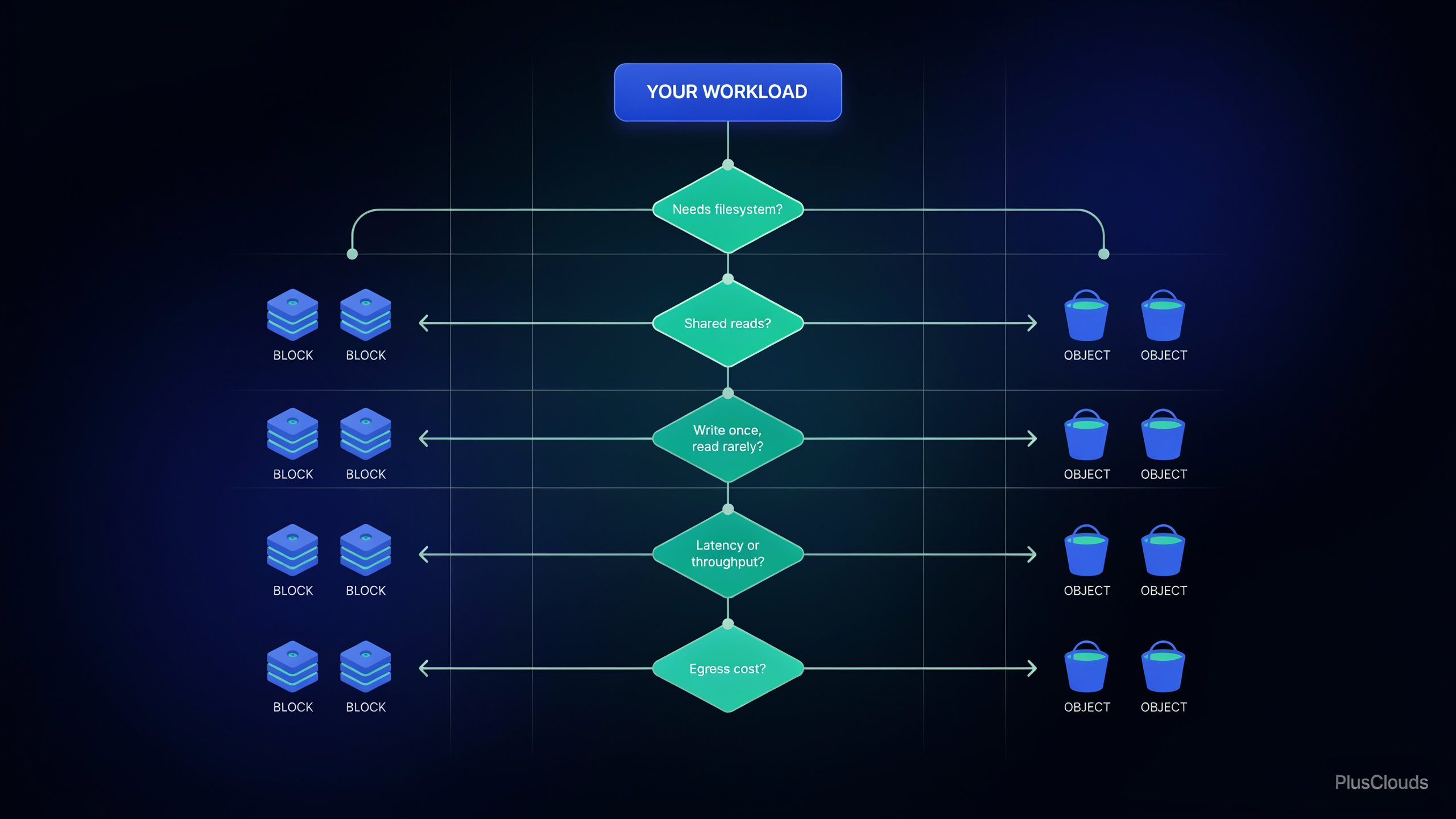
When you're sizing up a new workload, run it through these five questions:
- Does it need a filesystem or a database engine? If yes, block storage. No exceptions.
- Does more than one machine need to read the same data? If yes, object storage.
- Is the data written once and read rarely (or never)? Backups, logs, archives, checkpoints. Object storage, in the coldest tier you can tolerate.
- Is per-request latency the bottleneck, or is throughput? Latency-sensitive transactional systems go on block. Throughput-oriented bulk reads go on object.
- What does your data movement cost? Model your egress before you commit, not after the first invoice.
In practice, most architectures land on a hybrid: block volumes for compute-attached state, object storage for shared and archival data, and a clear policy about which data lives where. Write the policy down. The storage decisions that cause pain six months later are almost always the ones made implicitly.
If you're evaluating your options right now, it's worth testing both tiers with real workload patterns rather than benchmark numbers. Explore PlusClouds Cloud Storage to see how an S3-compatible, zero-egress object store fits your pipeline, and spin up a Cloud Server to see how the two layers behave together. The right storage architecture is the one you never have to think about again at 3 a.m., and getting there starts with matching each workload to the storage it actually needs.